Visit
chrome://extensions
in Chrome’s address bar
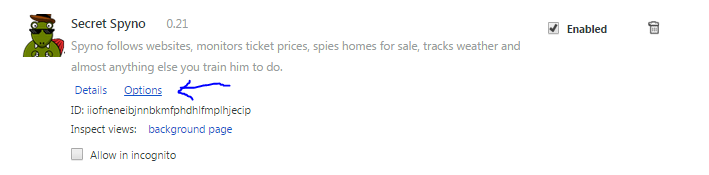 Open the options page[/caption]
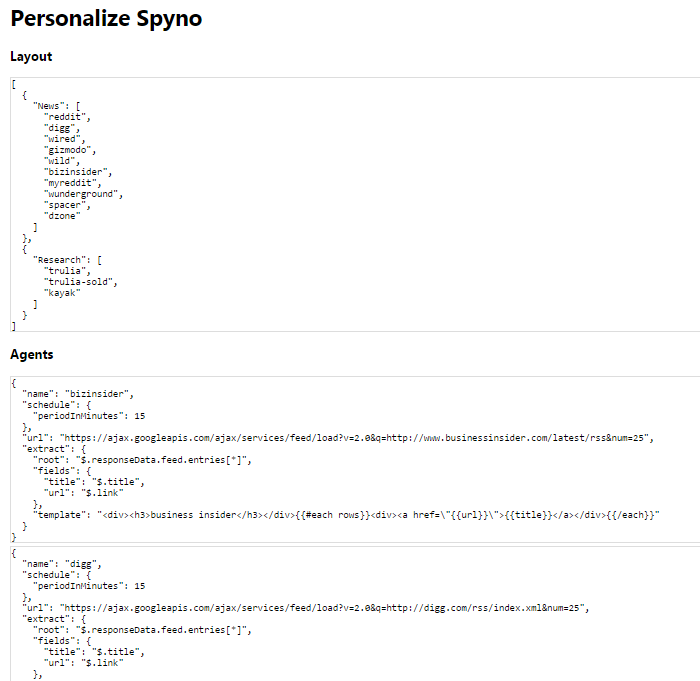 You’ll see this Spyno options page[/caption]
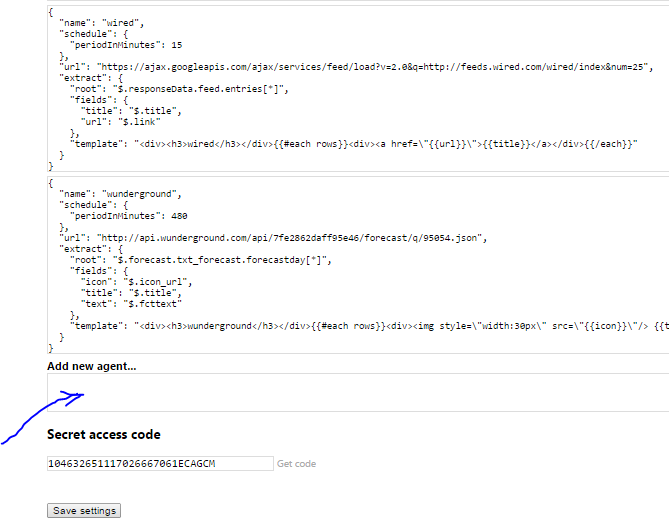 Scroll to the bottom and click in the box for “Add New Agent”[/caption]
Your Spyno Agents do all the work, so you don’t have to. Train agents for each website you want to gather information from. You tell each agent what information to grab, as well as how to present the information to you. Here’s how…
Visit
chrome://extensions
in Chrome’s address bar
Open the options page[/caption] You’ll see this Spyno options page[/caption] Scroll to the bottom and click in the box for “Add New Agent”[/caption]Agent example (options explained below):
{
  "name": "reddit",
  "schedule": {
    "periodInMinutes": 15
  },
  "url": "http://www.reddit.com/hot.json?limit=50",
  "extract": {
    "root": "$.data.children[*]",
    "fields": {
      "title": "$.data.title",
      "permalink": "$.data.permalink",
      "url": "$.data.url"
    },
    "template": "reddit »"
  }
}
Line 2 name: unique name for your Spyno agent (required) Line 4 periodInMinutes: how often you would like Spyno to fetch from the source URL Line 6 url: the source URL that has the info you want Spyno to fetch Line 7 extract: this section tells Spyno what info to grab and how you want it presented Line 8 root: JSONPath to the list of records you’re interested in Line 9 fields: JSONPath to the fields you’re interested in, and what name you want to give them Line 14 template: Handlebars template to tell Spyno how to draw the info you fetched. Spyno automatically packages your info into a list of “rows”, so your template should always have
You may include any html in your template, including ‹style›. E.g.,
"template": "

.fancy {
  font-variant: small-caps;
}

reddit


  »

"