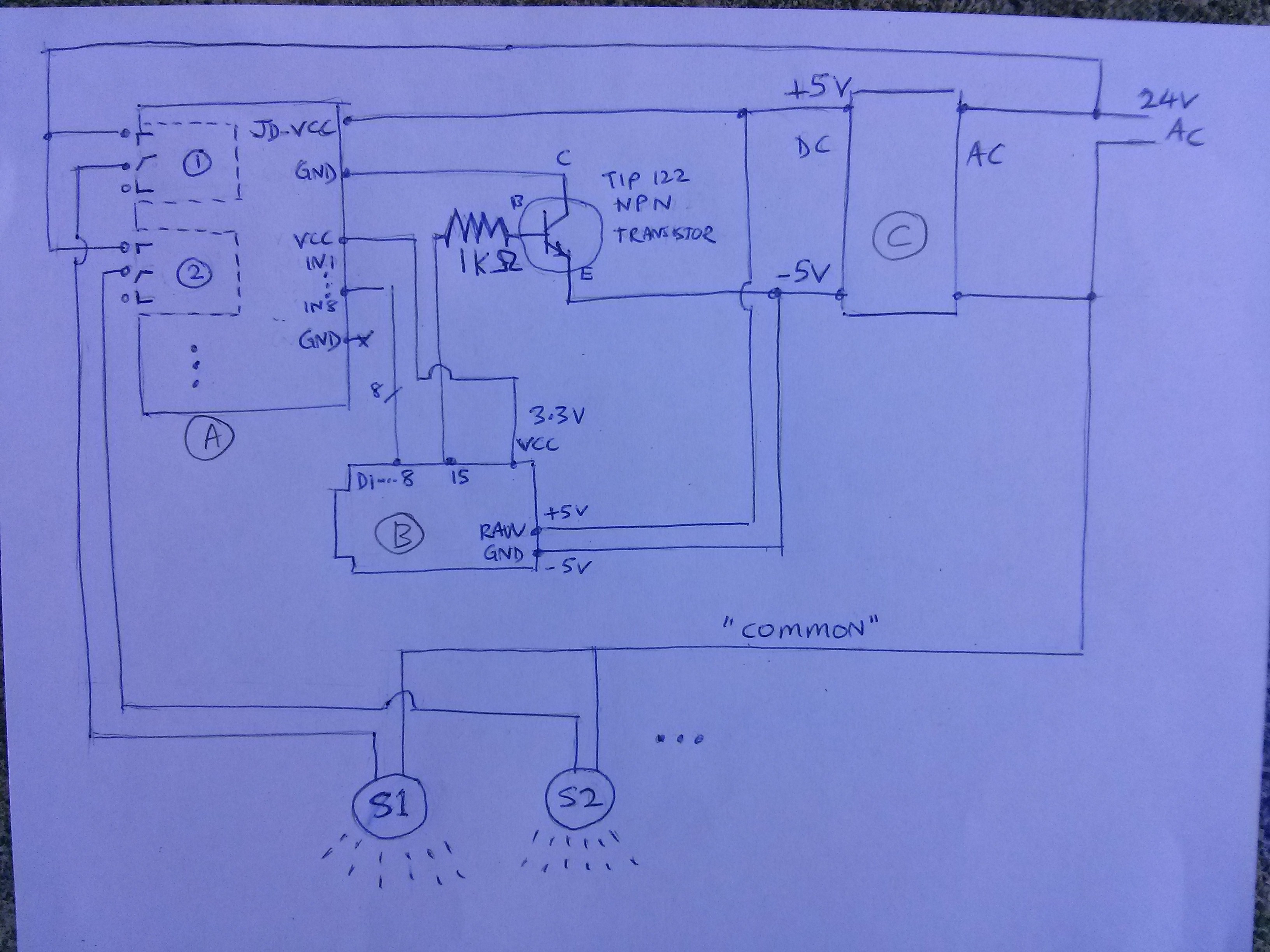
 My secret schematic. Disclaimer: use at your own risk, I’m not responsible for death or damages, don’t play with electricity, etc etc[/caption]
In some parts of the world, water usage is serious business. For example, there is a drought in California. If you live here, you know that they want you to water your lawn only twice a week. And if they catch you using too much water, they slap you with a higher rate for being a water pig. So water is serious business. But you love your garden and vegetables and trees and such. And they need water. So what can you do?
To be honest, I’m struggling to figure that out myself. My neighbor is getting hip with lush succulents that barely need any water. I might go that route too, but even if you do, you still need to be smart about your water. In fact, as you sprinkle more diverse plants around your landscape, watering might get more complicated since different plants need different amounts of water. And the first step to optimizing water usage is being able to CONTROL water flow from a computer program. On, off. Once we can do that, you can smart it up any which way to optimize when to switch sprinklers on or off. So that’s the main goal of this write-up – to show you how to set up a cheap and bulletproof base rig to programmatically switch your sprinklers.
But since we’re building, how about we make a wishlist of all the things we can do better than grandpa’s garage wall sprinkler controller:
Parts list:
Total: $17.14
Now here’s what we’ll be building…
[caption id=”attachment_425” align=”alignnone” width=”1000”] My secret schematic. Disclaimer: use at your own risk, I’m not responsible for death or damages, don’t play with electricity, etc etc[/caption]
S1 and S2 at the bottom are your sprinklers. 24 AC on the right is the standard power supply for your sprinkler valves. Block (A) on the left is the 8-channel relay. Block (B) in the middle-ish is the Cactus Micro microcontroller. Block (C) is the AC/DC converter to tap 24V AC from the standard sprinkler circuit and convert it to 5V DC for our control circuit.
At this point you might be wondering why is there a transistor in the middle of the schematic, if we already have a relay. Well, you don’t need it. But I put it in there as a safety feature. Remember how water is serious business? I figured that I’m okay if my chip malfunctions and it doesn’t turn on the water. But what’s worse is if it malfunctions and the water gets stuck OPEN and floods the yard and the sidewalk and the street and neighbors while I’m away. That would be an expensive disaster.
The possibility crossed my mind because I fried one of my Cactus Micro pins while soldering the headers, and it got stuck and pulled one relay open. Had that relay been connected to a sprinkler, and had that sprinkler locked open while I wasn’t home, I would have returned to a $1000 water bill before I could shut it off.
So that’s why I added that extra transistor switch. (I would have added 5 more safety mechanisms if I had the patience.) It functions like a Two-man rule control. Like when they needed two keys to arm the nuclear missile in the Hunt for Red October. You can see that the transistor guards the power supply of the relay. What this means is that TWO things have to work to open a sprinkler relay: 1) an “open” signal from the Cactus Micro microcontroller D1-D8 pins to the relay’s IN1-IN8 pins 2) an “enable” signal from the Cactus Micro’s D15 pin to the transistor
This way, two pins have to fail for the relay to be stuck open – which is still possible – but less likely than one pin failing. Can’t be too sure.
OK. Now we build. First, prepare the Cactus Micro. The original firmware is garbage. We want to replace it with espduino. Espduino gives you rock-solid WiFi and lets you work like a civilized person via a REST API, not a caveman via serial commands.
Follow instructions in the 2 links below. First upload the Arduino sketch to configure the Cactus as a serial programmer. Then flash the ESP8266 firmware through the Cactus host board. http://wiki.aprbrother.com/wiki/How_to_made_Cactus_Micro_R2_as_ESP8266_programmer https://github.com/tuanpmt/espduino
After the espduino firmware is on the ESP8266, replace the “serial programmer” sketch above with our real “Sprinkler Brain” sketch below:
#include
#include
#include

#define MY_NAME "THING_1"
// THING_1
#define TS_KEY "ABC123"
#define SSLAB_KEY "123ABC"
// hygrometer analog input
#define SPRINKLER_START_PIN 3
#define ESP_PIN 13
#define HYGRO_PIN 18
#define RELAY_PIN 15
#define TEST_SCHEDULE_MODE 0

/*******************************************************
 * MinuteMap class
 *******************************************************/

const char g_b64alpha[] = "ABCDEFGHIJKLMNOPQRSTUVWXYZabcdefghijklmnopqrstuvwxyz0123456789+/";

class MinuteMap {
public:
  MinuteMap() {
    reset();
  }
  void setHourMin(byte hour, byte minStart, byte minStop)
  // set minuteMap bits [minStart, minStop)
  {
    if (minStart % 2 != 0)
      minStart -= 1; // snap down to 2 min range
    if (minStop % 2 != 0)
      minStop += 1; // snap up to 2 min range

    minStart = max(minStart, 0);
    minStop = max(minStart, minStop);

    byte mmBaseIdx = hour*32;
    byte mmStartIdx = mmBaseIdx + minute2mmIdx(minStart);
    byte mmStopIdx = mmBaseIdx + minute2mmIdx(minStop);

    for (byte i=mmStartIdx; i < mmStopIdx; i++)
      setMinuteMapBit(i);
  }
  void setMinuteMapBit(byte idx)
  {
    byte mmHourIdx = idx / 32;
    byte remainder = idx % 32;
    long bit = 1UL << remainder;
    m_minuteMap[mmHourIdx] |= bit;
  }
  bool isHourMinSet(byte hour, byte min)
  {
    byte mmIdx = minute2mmIdx(min);
    long bit = 1UL << mmIdx;
    return m_minuteMap[hour] & bit;
  }
#if 0
  void printMinuteMap()
  {
    char mmBits[70];
    memset(mmBits, 0, sizeof(mmBits));

    byte mmBitsIdx = 0;
    for (byte i=0; i < 2; i++)
      for (byte j=0; j < 32; j++)
      {
        long bit = 1UL << j;
        if (m_minuteMap[i] & bit)
          mmBits[mmBitsIdx++] = '1';
        else
          mmBits[mmBitsIdx++] = '0';
      }

    Serial.println(mmBits);
  }
#endif
  void reset()
  {
    m_minuteMap[0] = m_minuteMap[1] = 0;
  }
  void setWithBase64code(const char *b64code)
  {
    reset();
    byte mmIdx = 0;
    const int codeLen = strlen(b64code);
    for (int i=0; i < codeLen; i++)
    {
      byte c = b64code[i];
      byte val = getBase64letterVal(c);
      if (val == 255)
        continue; // bad letter

      // scan bits of base64 lettter
      // and set bits in minuteMap
      for (byte b=0; b < 6; b++, mmIdx++)
        if (val & (1UL << b))
          setMinuteMapBit(mmIdx);
    }
  }
  byte getBase64letterVal(char c)
  {
    for (byte val=0; val < 64; val++)
      if (g_b64alpha[val] == c)
        return val;

    return 255;
  }
  void getMinuteMapBase64code(char *code)
  // Note: code buf needs to be large enough; I'm not checking sizes
  {
    byte codeIdx = 0;

    /*
     * Iterate through the 32+32 bits that represent
     * the minute intervals in the 2 hours we're tracking.
     * Convert each 6-bit chunk into a base64 letter.
     */
    byte b64letterVal = 0;
    byte b64bitIdx = 0;
    for (byte i=0; i < 2; i++)
      for (byte j=0; j < 32; j++)
      {
        long bit = 1UL << j;
        if (m_minuteMap[i] & bit)
          b64letterVal |= 1 << b64bitIdx;

        b64bitIdx = (b64bitIdx+1) % 6;

        if (b64bitIdx == 0)
        {
          // we've visted 6 bits
          // -- output the completed base64 letter
          code[codeIdx++] = g_b64alpha[b64letterVal];
          b64letterVal = 0; // reset
        }
      }

    if (b64bitIdx != 0)
    {
      // output final base64 letter
      code[codeIdx++] = g_b64alpha[b64letterVal];
    }

    code[codeIdx] = '\0'; // NULL-terminate string
  }

  byte minute2mmIdx(byte minute)
  // [0,60) -> [0, 32)
  {
    byte quadrant = minute / 15;
    byte idx = quadrant * 8; // we use 8 bits to track every 15 minutes

    byte remainMins = minute % 15;
    idx += remainMins / 2; // we use 1 bit to track 2-minute slots

    return idx;
  }

private:
  long m_minuteMap[2]; // 2 x 32 bits
                       // = 2-minute chunks over 2 hours
};

/*******************************************************
 * SprinklerBrain class
 *******************************************************/

#define NUM_SPRINKLER_CHANNELS 8
#define ESP_REFRESH_THRESH 2
#define MAX_BUFSZ 300
char g_buf[MAX_BUFSZ];
char g_sprinklerStr[NUM_SPRINKLER_CHANNELS+1];
boolean g_isWifiConnected = false;

void wifiCb(void* response)
{
  uint32_t status;
  RESPONSE res(response);

  if (res.getArgc() != 1)
    return;

  res.popArgs((uint8_t*)&status, 4);
  if (status != STATION_GOT_IP)
    return;

  Serial.println("WIFI CONNECTED");
  g_isWifiConnected = true;
}

class SprinklerBrain {
public:
  SprinklerBrain()
  : m_esp(&Serial1, &Serial, ESP_PIN),
    m_lastClockSync(0), m_lastDataUpload(0),
    m_lastESPrefresh(0), m_lastHygroRead(0),
    m_lastCommandsFetch(0), m_sprinklerCommandTime(0),
    m_needToRefreshESP(0), m_hygroVal(0)
  {
    for (byte i=0; i < NUM_SPRINKLER_CHANNELS; i++)
    {
      m_sprinklerState[i] = false;
      m_sprinklerCommand[i] = '-'; // default to auto
    }
  }

  void setup() {
    pinMode(RELAY_PIN, OUTPUT);
    digitalWrite(RELAY_PIN, LOW); // disable relay

    for (byte i=0; i < NUM_SPRINKLER_CHANNELS; i++)
    {
      pinMode(SPRINKLER_START_PIN+i, OUTPUT); // sets the digital pin as output
      digitalWrite(SPRINKLER_START_PIN+i, HIGH); // this relay uses reverse logic!
    }

    /*
     * Set Sprinklers
     * Zone A (Mon & Thu, 10.30pm)
     * 1 12
     * 2 15
     * 3 18
     * 4 18
     *
     * Zone B (Mon & Thu, 11pm)
     * 5 14
     * 6 8
     * 7 12
     */
    // Zone A
    m_minuteMap[0].setHourMin(0, 0, 12);  // 12 mins
    m_minuteMap[1].setHourMin(0, 12, 28); // 16 mins
    m_minuteMap[2].setHourMin(0, 28, 46); // 18 mins
    m_minuteMap[3].setHourMin(0, 46, 60); // 14 mins
    m_minuteMap[3].setHourMin(1, 0, 4);   // +4 mins
    // Zone B
    m_minuteMap[4].setHourMin(1, 4, 18);  // 14 mins
    m_minuteMap[5].setHourMin(1, 18, 26); // 8 mins
    m_minuteMap[6].setHourMin(1, 26, 38); // 12 mins
  }
  void loop() {
    /*******************************************
     * Do offline work
     *******************************************/

    readHygro();

    /*******************************************
     * Do offline work that depends on Time
     *******************************************/

    if (timeStatus() != timeNotSet)
    {
      doSprinkle();
    }

    /*******************************************
     * Do online work
     *******************************************/

    if (refreshESP())
      return;

    m_esp.process();

    if (!g_isWifiConnected)
      return; // can't do anything without wifi these days...

    syncClock();

    fetchCommands();

    uploadData();
  }

  bool refreshESP() {
    if (!ESPneedsRefresh())
      return false;

    m_lastESPrefresh = millis();
    m_needToRefreshESP = 0;

    Serial.println("Reset ESP");
    g_isWifiConnected = false;

    m_esp.disable();
    delay(500);
    m_esp.enable();
    delay(500);
    m_esp.reset();
    delay(500);

    int waitIter = 0;
    while (!m_esp.ready())
    {
      if (waitIter++ > 20)
      {
        // ESP failed to come up
        // -- force hardware refresh
        m_needToRefreshESP = ESP_REFRESH_THRESH;
        return true;
      }
      Serial.println("Waiting for ESP...");
    }

    setupWifi();

    Serial.println("ARDUINO: system online");

    return true;
  }

  bool restGet(char *host, char *path, char *buf, int sz) {
    REST rest(&m_esp);

    if (!rest.begin(host)) {
      m_needToRefreshESP++;
      return false;
    }

    rest.get(path);

    memset(buf, 0, sz);

    if (rest.getResponse(buf, sz) != HTTP_STATUS_OK) {
      m_needToRefreshESP++;
      return false;
    }

    m_needToRefreshESP = 0;
    return true;
  }

  void uploadData() {
    if (!dataNeedsUpload())
      return;

    Serial.println("ARDUINO: upload to thingspeak...");

    m_lastDataUpload = millis();

    g_sprinklerStr[NUM_SPRINKLER_CHANNELS] = '\0';
    for (byte i=0; i < NUM_SPRINKLER_CHANNELS; i++)
      g_sprinklerStr[i] = (m_sprinklerState[i])? '1' : '-';

    int ret = snprintf(g_buf, MAX_BUFSZ,
      "/update?key=%s&field1=%s&field2=%d&field3=%02d:%02d:%02d&field4=%d&field5=%s&field6=%d&field7=",
      TS_KEY, MY_NAME,
      weekday(), hour(), minute(), second(),
      m_hygroVal, g_sprinklerStr, m_needToRefreshESP);
    if (!(ret > 0 && ret < MAX_BUFSZ))
      return;

    // append sprinkler schedule to last field
    for (byte i=0; i < NUM_SPRINKLER_CHANNELS; i++)
    {
      if (strlen(g_buf) > MAX_BUFSZ - 14)
        break;

      if (i > 0)
        *(g_buf + strlen(g_buf)) = ',';

      m_minuteMap[i].getMinuteMapBase64code(g_buf + strlen(g_buf));
    }

    //Serial.println(g_buf);

    if (restGet("api.thingspeak.com", g_buf, g_buf, MAX_BUFSZ))
    {
      Serial.println("RESPONSE: ");
      Serial.println(g_buf);
    }
  }

  void fetchCommands() {
    if (!commandsNeedRefresh())
      return;

    Serial.println("ARDUINO: fetching commands...");

    m_lastCommandsFetch = millis();

    sprintf(g_buf, "/homebot/sprinklers/command?key=%s",
      SSLAB_KEY);

    if (!restGet("secretsciencelab.appspot.com", g_buf, g_buf, MAX_BUFSZ))
      return;

    char *firstDelim = strchr(g_buf, ';');
    if (firstDelim == NULL)
      return; // no command

    Serial.println(g_buf);

    char *timeStr = g_buf;
    char *cmdStr = firstDelim+1;
    *firstDelim = '\0';

    m_sprinklerCommandTime = atol(timeStr);

    for (int i=0; i < NUM_SPRINKLER_CHANNELS; i++)
      m_sprinklerCommand[i] = '-'; // default to 'auto'

    int cmdLen = strlen(cmdStr);
    for (int i=0; i < cmdLen && i < NUM_SPRINKLER_CHANNELS; i++)
      m_sprinklerCommand[i] = cmdStr[i];
  }

  void readHygro() {
    if (!hygroNeedsRead())
      return;

    m_lastHygroRead = millis();

    // http://www.xuru.org/rt/PR.asp
    m_hygroVal = analogRead(HYGRO_PIN);

    //Serial.println("Hygro reading: ");
    //Serial.println(m_hygroVal);
  }

  void setupWifi() {
    Serial.println("ARDUINO: setup wifi");
    m_esp.wifiCb.attach(&wifiCb);
    m_esp.wifiConnect("Anomalocaris","gp3gh0ddxf");
  }

  void syncClock() {
    if (!clockNeedsSync())
      return;

    Serial.println("ARDUINO: sync clock...");

    sprintf(g_buf, "%s", "/pdt/now.json?format=\\H%20\\M%20\\S%20\\d%20\\m%20\\y");
    //Serial.println(g_buf);

    if (!restGet("www.timeapi.org", g_buf, g_buf, MAX_BUFSZ-1))
      return;

    char *dateStr = strchr(g_buf, ':');
    if (dateStr == NULL)
      return;
    dateStr += 2;
    char *end = strchr(dateStr, '"');
    if (end == NULL)
      return;
    *end = '\0';

    Serial.println(dateStr);

    int H, M, S, d, m, y;
    byte numRead = sscanf(dateStr, "%d %d %d %d %d %d", &H, &M, &S, &d, &m, &y);
    if (numRead != 6)
      return;

    setTime(H, M, S, d, m, y);
    m_lastClockSync = millis();

    Serial.println("ARDUINO: clock synced!");
    m_needToRefreshESP = 0;
  }

  void doSprinkle() {
    boolean isInScheduleWindow = false;
    #if TEST_SCHEDULE_MODE == 1
      isInScheduleWindow = true;
    #else
      if ((weekday() == 2 || weekday() == 5) // Mon/Thu
        && (hour() == 22 || hour() == 23)) // 10pm/11pm
        isInScheduleWindow = true;
    #endif

    byte myHour = hour() % 2;
    byte myMin = minute();

    // init sprinkler states to OFF
    memset(m_sprinklerState, 0, sizeof(m_sprinklerState));

    // check if we have manual "on" request
    int manualOn = -1;
    for (byte i=0; i < NUM_SPRINKLER_CHANNELS && manualOn < 0; i++)
      if (m_sprinklerCommand[i] == '1')
        manualOn = i;

    time_t epochSecs = now(); // unsigned long in
    if (manualOn >= 0
      && m_sprinklerCommandTime < epochSecs
      && epochSecs - m_sprinklerCommandTime < 300)
    {
      // allow one sprinkler to be forced on... but only for up to 5 mins
      m_sprinklerState[manualOn] = true;
    }
    else if (isInScheduleWindow)
    {
      // process MinuteMap to set sprinkler states
      for (byte i=0; i < NUM_SPRINKLER_CHANNELS; i++)
        if (m_minuteMap[i].isHourMinSet(myHour, myMin)
          && m_sprinklerCommand[i] != '0')
          m_sprinklerState[i] = true;
    }

    // process sprinkler states to switch sprinklers on/off
    boolean enableRelay = false;
    for (byte i=0; i < NUM_SPRINKLER_CHANNELS; i++)
      if (m_sprinklerState[i])
      {
        enableRelay = true;
        digitalWrite(SPRINKLER_START_PIN+i, LOW);
      }
      else
        digitalWrite(SPRINKLER_START_PIN+i, HIGH);

    // "two-man rule" switch to minimize "on" faults
    // turning on water is serious business!
    if (enableRelay)
      digitalWrite(RELAY_PIN, HIGH);
    else
      digitalWrite(RELAY_PIN, LOW);
  }

private:
  boolean clockNeedsSync() {
    if (timeStatus() == timeNotSet)
      return true;

    if (m_lastClockSync == 0)
      return true;

    if (hour() > 20 || hour() < 2)
    {
      // don't sync during operation window
      return false;
    }

    if (millis() - m_lastClockSync > 900000) // 15 mins
      return true;

    return false;
  }

  boolean dataNeedsUpload() {
    if (m_lastDataUpload == 0)
      return true;

    // thingspeak only lets 1 update through every 15 seconds
    if (millis() - m_lastDataUpload > 16000)
      return true;

    return false;
  }

  boolean commandsNeedRefresh() {
    if (m_lastCommandsFetch == 0)
      return true;

    // FIXME: increase the period?
    // we don't need such heavy polling for responsiveness
    if (millis() - m_lastCommandsFetch > 15000) // 15s
      return true;

    return false;
  }

  boolean ESPneedsRefresh() {
    if (m_lastESPrefresh == 0)
      return true;

    if (millis() - m_lastESPrefresh < 120000) // 2 minutes
    {
      // don't refresh too often
      return false;
    }

    if (m_needToRefreshESP >= ESP_REFRESH_THRESH)
      return true; // exceeded error thresh for refresh

    if (!g_isWifiConnected)
      return true; // couldn't connect wifi, reboot+retry

    return false;
  }

  boolean hygroNeedsRead() {
    if (m_lastHygroRead == 0)
      return true;

    if (millis() - m_lastHygroRead > 5000) // 5 seconds
      return true;

    return false;
  }

  ESP m_esp;
  unsigned long m_lastClockSync; // uses millis()
  unsigned long m_lastDataUpload; // uses millis()
  unsigned long m_lastESPrefresh; // uses millis()
  unsigned long m_lastHygroRead; // uses millis()
  unsigned long m_lastCommandsFetch; // uses millis()
  byte m_needToRefreshESP;

  MinuteMap m_minuteMap[NUM_SPRINKLER_CHANNELS];
  boolean m_sprinklerState[NUM_SPRINKLER_CHANNELS];
  char m_sprinklerCommand[NUM_SPRINKLER_CHANNELS];
  time_t m_sprinklerCommandTime;
  int m_hygroVal;
};

/*******************************************************
 * "Main"
 *******************************************************/

SprinklerBrain brain;

void setup() {
  Serial1.begin(19200);
  Serial.begin(19200);
  delay(10); // safety brick preventer
  brain.setup();
}

void loop() {
  brain.loop();
}
Some noteworthy bits in the sketch above: - syncClock() syncs the time on your Cactus Micro with timeapi.org every 15 minutes - readHygro() is an example of how you might add a sensor to your system - fetchCommands() fetches commands from my “cloud” mothership (in the form of a string like
'1----0-'
where 1 is force on, 0 is force off, - is follow program). - uploadData() pushes Cactus data/state to thingspeak.com servers. I use this thingspeak data stream to render my smartphone “app” UI - restGet() is the wrapper function I use to make HTTP REST calls. It counts errors so that if I see too many consecutive ESP8266 errors, I can power-cycle the ESP8266. - MinuteMap is the compact data structure I use to store my sprinkler schedule - The Time.h Arduino library is from here
I set up my “server” on Google App Engine. It’s awesome and Google gives you a very generous free daily quota. Unlike Amazon’s EC2 which rails you with no lube and annoying bills even if you do something innocent like leave one terminal connected to your instance. With Google App Engine, I have never needed more than the free daily quota, even with my many projects bashing one app.
(Email me at aaron@secretsciencelab.com if you want my AppEngine code. I didn’t have time to carve it out and clean it up to post here)
Then I made a simple web app UI which serves 2 purposes: 1) manually turn sprinklers on/off to impress friends 2) monitor the sprinklers in action and to make sure it’s working
[caption id=”attachment_410” align=”alignnone” width=”360”]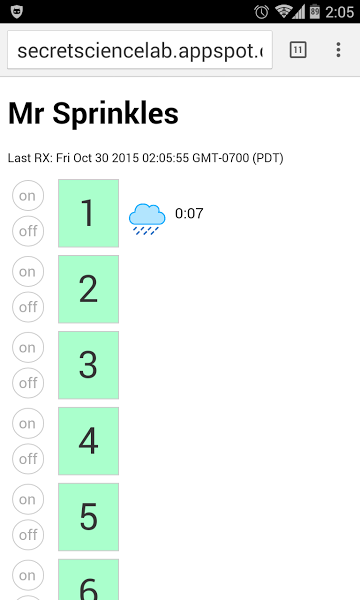 Here we can see that Sprinkler Channel 1 is running and it has 7 mins left on its schedule. I can tap the on/off buttons on the left to manually override the schedule.[/caption]
(Email me at aaron@secretsciencelab.com if you want my HTML/Javascript web app code. I’m happy to share, just too lazy right now to package it nicely to post here)
After you have the software loaded, hook it up following the schematic. Hopefully you will end up with something that looks better (and is less of a fire hazard) than this: [caption id=”attachment_408” align=”alignnone” width=”768”]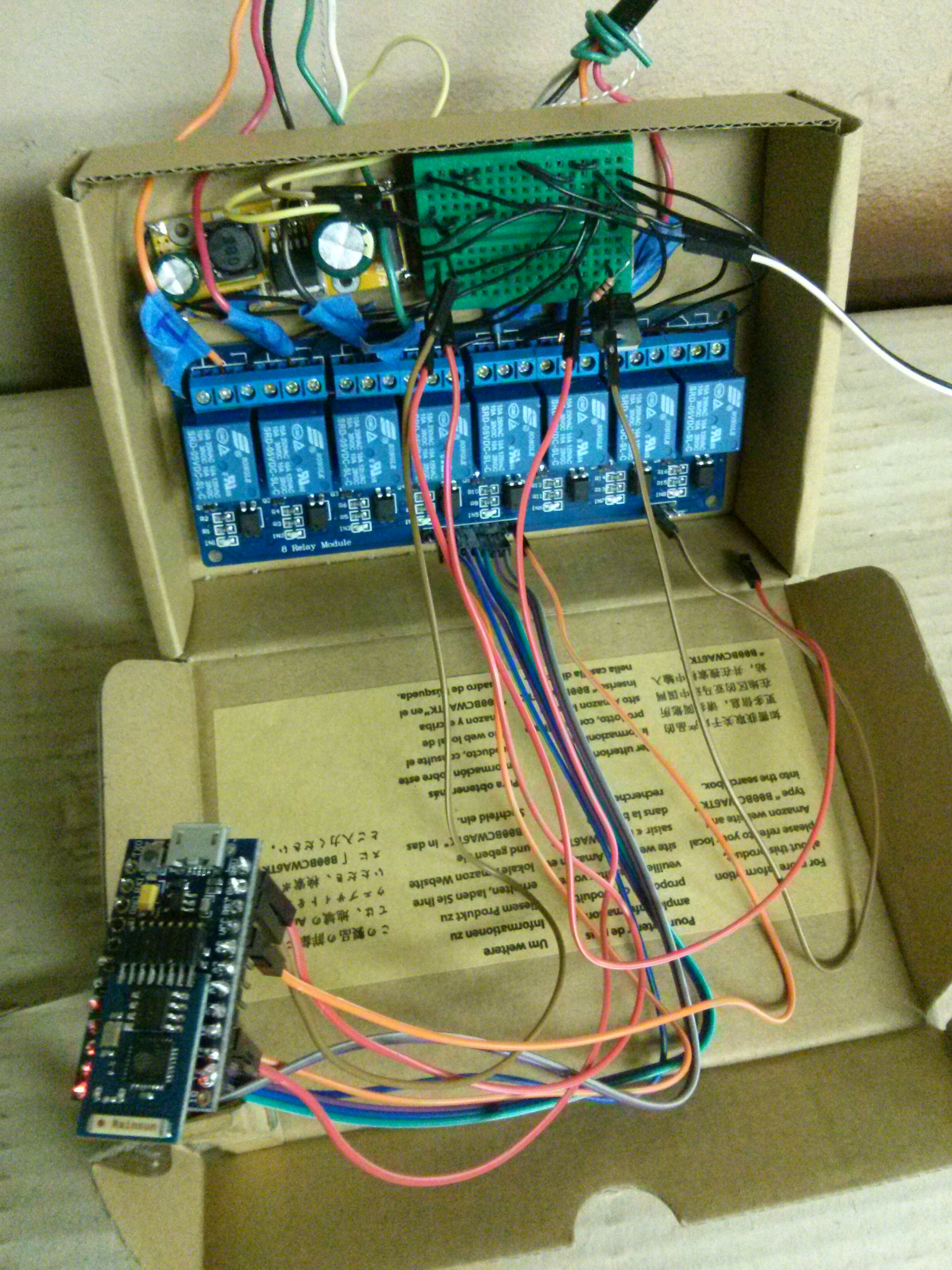 AC/DC converter at top left. Mini breadboard to connect wires at top right. Transistor is on breadboard. 8-channel relay at bottom of box. Cactus micro with gazillion wires going to the relay and breadboard. I used the Rev1 Cactus in this pic. You should get the Rev2.[/caption]
Action shot: https://www.youtube.com/watch?v=6UwaNoreDKQ
Happy Sprinkling!